
Monthly Archives: February 2008

Apple Mac Backup 3 gotcha

Mac Repair Darnestown, and Gaithersburg.

We brought an Imac G5 back from the dead.  The power supply had failed, taking with it the Logic Board, and the hard drive.  Lucky for us, and Jim D. the power problem had not killed off the hard drive all together.  It was damaged, but we were able to get much of the data off of it.

One more little example in the list of Mac, and Windows PC differences. If you have a Mac, you can download the Apple Backup program, commonly called backup 3.

Backup 3 allows you to backup all of your personal settings to your iDisk. But, — and please correct me if I am wrong — it does not seem to automatically backup your e-mails. From what I can tell, it grabs the settings, but not the actual e-mails. Could it be that Apple assumes that all of it’s users use IMAP e-mail where the mail stays on the server? I have nothing against IMAP e-mail — been using it myself for years, but most people I run into are using POP3. So be careful with the Mac Backup 3 program. You may need to set up a custom backup job it you want to save your old e-mails.
Ijamsville, MD service call – diagnose router

Fernando was sick today, so I headed up to Ijamsville to help out Brenda C.

Their Linksys WRT54G was behaving poorly. It was having trouble pulling an IP from comcast. It had original firmware, so I updated the firmware, but it still was not pulling an IP. Replace the Linksys with a brand new Trendnet TEW-632BRP router. It pulled an IP right away. I also updated the wireless drivers on her laptop, and then she was back, up and running!

Set up New Computer

Last week I went over to Natalie B’s in Potomac, MD.  Her, and her husband had purchased a new notebook computer, and a new HP Multi-Function.  They wanted their new notebook set up properly on their wireless, and specific files and settings transferred.  The new computer was running Windows Vista Home Premium.  It had a good fast processor, and 2GB of memory.  It seems a bit crazy, but you really need to have 2GB of memory to run Vista well.  On the old computer the two of them were sharing one Outlook profile.  On the new computer we went with separate windows logins, and thus now she gets her e-mails, and he gets his.  Ran into a problem copying the archive.pst, but was able to work around it, so even their old e-mails were moved to the new computer.  Also set up the network multi-function.  Everything went smoothly, when I left Natalie’s notebook all set.

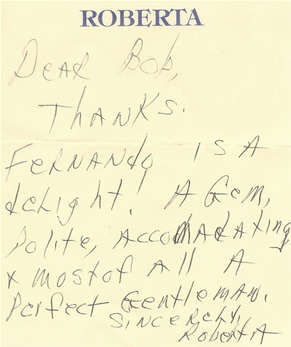
Kudos for Fernando!

Today we got this note from Roberta W. on Chevy Chase St, in Kentlands, Gaithersburg, MD. Sometimes the nicest things come via Snail Mail!  Way to go FernandoKudos to Fernando from Roberta W